Robosim: lightweight multi-player robotics simulator
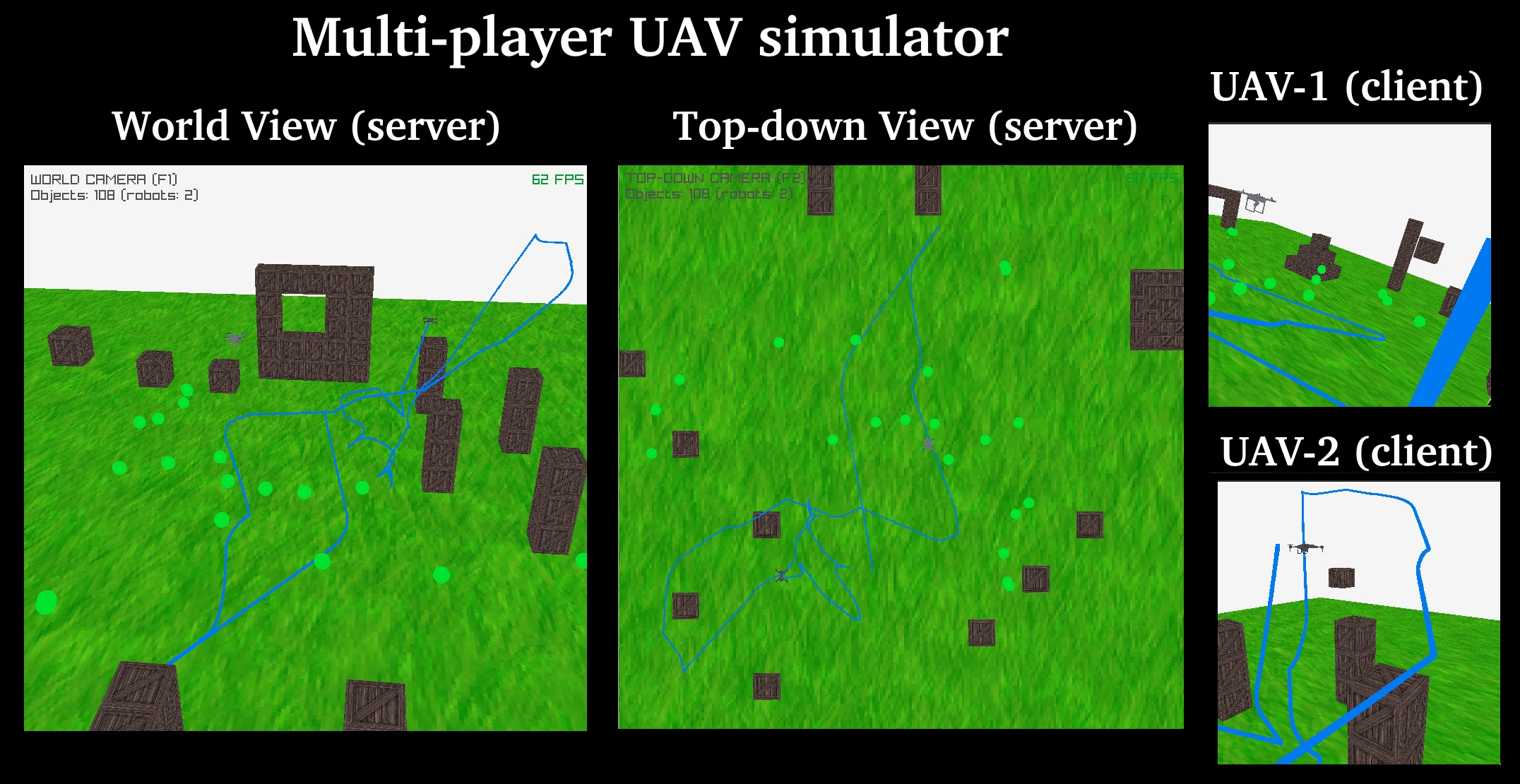
Robosim is a client-server simulator for multi-player robotics. The server holds the 3D scene (floor, walls, obstacles, controllable robot). Clients connect over TCP with a msgpack protocol and send JSON-shaped commands (move, entity_spawn, robot_get_state, ...). The server implements the physics and the actual simulation, while the client simply receive the world state as images. So, it is not a shared world, but rather the client operates only on top of rendered images. The server uses microecs as a data structure, where the World object is a Struct-of-Arrays representing the entitites' components (see ECS wikipedia).
Docsumentation. Se this link: open-visual-robotics.gitlab.io/robosim or open it locally (e.g Getting started.
Install & run
python -m venv .venv/ && source .venv/bin/activate     # Windows: .venv\Scripts\Activate.ps1
# NOTE: -e is mandatory, otherwise it will not behave ok for development
pip install -e .[client]                               # server + engine + client; `pip install -e .` for server only

# Checking installation by running tests
pytest test/ pkg/ # pkg is the 3rd party tests
bash test/e2e/run_all.sh

# Run the simulator
./cli/robosim.py -p 5555 [--map_path MAP.json] [--headless] [-i SCRIPT]   # server
./cli/client.py localhost -p 5555                                         # client (may be on another machine)
Install editable; the server and client have separate dependencies and can run on different machines. The client can control the UAV using: W/A/S/D, arrows, Q/E, and PageUp/PageDown. See the code for actual keybinds. For VSCode / Rider / static-analyzer setup see Integration with IDEs.
Command Line Interface tools
In cli/ we offer a few standalone runnable python programs. Most of them are symlinks to their
implementation under src/<tool>/, with <tool> being one of the standalone programs this simulator is
built of.
cli/
  robosim.py       -> ../src/robosim/robosim.py     # server: World + physics + TCP listener + renderer
  client.py        -> ../src/client/client.py       # interactive client: keyboard control, FPV, trajectory
  mapeditor.py     -> ../src/mapeditor/main.py      # map editor: select/move objects, collision view, F5/F6 save+load
  robosim-ncat.py                                   # netcat-like protocol tool (stdin commands -> replies)
Map editor
cli/mapeditor.py opens the same map JSONs as the server (default resources/maps/01-basic.json) to inspect and
nudge objects before running the scene:
./cli/mapeditor.py [--map_path MAP.json] [--headless]
- Select: hovering highlights the object under the cursor; a left click makes it the selection, and
Ctrl+left-click toggles it in/out. Clicking empty space leaves the selection alone.Otoggles collision rendering. - Move the selection:
Shift+left-drag moves the whole selection; Left/Right → X, Up/Down → Z, PageUp/PageDown → Y nudge at 2 m/s. - Camera: WASD to move, right-drag to rotate, scroll to move along the view, Shift for fast.
F5(orCtrl+S) saves the world + editor state toresources/state.json(gitignored);F6reloads it;Rreloads the map the editor was started with. The server's ownF6reads the same file, so an editor save can be loaded straight into a running scene.- TCP CLI (
--port, default42068): plain ASCII lines, one command per line (ncat localhost 42068) —help,me_save_state(theF5twin),me_load_state(theF6twin: swaps the live scene for whatever is inresources/state.json).
Saving writes state.json, not the map JSON — map export is not implemented yet.
The state file is the handoff between the two apps, in both directions. Both read ["world"] out of it
and both write it with the same serializer, so an editor save boots the server and a server save
(sim_save_state / F5) boots the editor:
./cli/mapeditor.py --map_path resources/maps/01-basic.json   # edit, F5 -> resources/state.json
./cli/robosim.py   --map_path resources/state.json           # run the scene the editor saved
./cli/mapeditor.py --map_path resources/state.json           # ...and back, after the server's F5
Both directions are covered end to end by test/e2e/editor-to-server/.
Interactive CLI
cli/robosim-ncat.py is a netcat-like client for the protocol with a short human shorthand:
./cli/robosim-ncat.py localhost -p 5555
> {'status': 'connected', 'id': 0, 'timestamp': '1900-01-01T00:00:00.123456'}
move 0 0 1 2 0 0.5      # X Y Z pitch yaw roll → {"cmd": "move", "control_input": [0, 0, 1, 2, 0, 0.5]}
> {'status': 'Applied control_input=(0, 0, 1, 2, 0, 0.5). Current pose: (...)', ...}
The wire format and the full command set are on Protocol & Wire Format.
Repository layout
cli/        # executables: robosim.py + client.py + mapeditor.py (symlinks into src/), robosim-ncat.py (protocol tool)
src/
  robolib/    # reusable engine: math/physics, collisions, netcode, ECS components, plugin base
  robosim/    # server process (run-in-place): builds the World, owns systems + main loop, maps/
  mapeditor/  # map editor: hover/select/move objects, collision view, F5/F6 state save/load
  plugins/    # app-level plugins: manual_move, race, trajectory_mission
  client/     # standalone client: keyboard control, FPV, trajectory generation
pkg/        # vendored libraries: microecs, microspec, micronetcode, loggez, ...
resources/  # models, textures, maps
test/       # integration/ (DST fixtures), e2e/, manual diagnostics, lint
docs/       # prose pages + the shared pdoc builder
Naming: robosim is the product, the pip distribution, and the server process (src/robosim/);
robolib is the reusable engine library it imports (src/robolib/). robolib and plugins install as
importable packages; src/robosim/, src/mapeditor/ and src/client/ run in place (no __init__.py).
robolib is an ECS: all state lives in one microecs.World, an entity is an id plus components
(data only), and behavior lives in systems (internal) and plugins (external, registered by name).
Entities are spawned with plain functions like make_robot(...) — there are no entity OOP classes.
Documentation
The site is built from docs/source/ with pdoc (bash docs/build_docs.sh, output in public/).
Highlights:
- Getting started — first run, server and client.
- Architecture & main loop — ECS, ticks/subticks, module hierarchy, tick invariants.
- Scripting & DST — tick-indexed scripts, test fixtures, and how to run the suites.
- Plugins — the plugin API and message flow.
- Protocol & wire format — framing, commands, state inspection, streaming.
- Collision detection — work in progress.
- Integration with IDEs.
- Built-in components and protocol endpoints — generated at build time and shown in the sidebar.
The sidebar is the docs/source/ tree, so a new markdown file appears there on the next build. Vendored
packages that ship their own docs are built into public/vendored/<name>/
(microecs, microspec, micronetcode);
the shared builder lives in docs/shared/.